


ALGO Traffic
4.120.00 Reviews
App Specs
- Version
- 3.1.5
- Updated On
- License
- Free
- Downloads
- 10,000+
- Developer
- Alabama Dept of Transportation
- Categories
- Maps & Navigation
- Platform
- Android
Screenshots
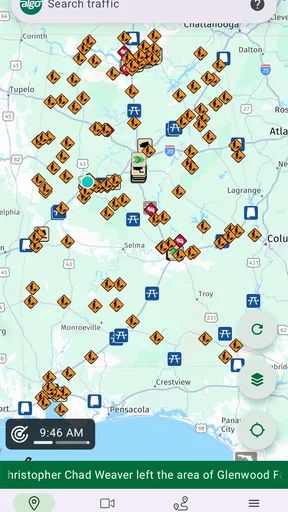
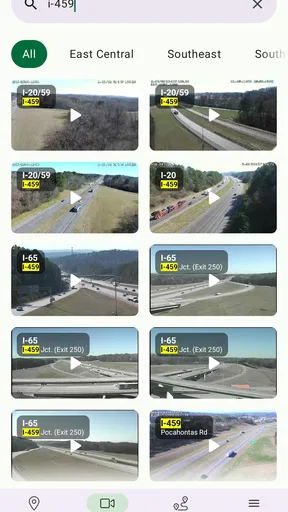
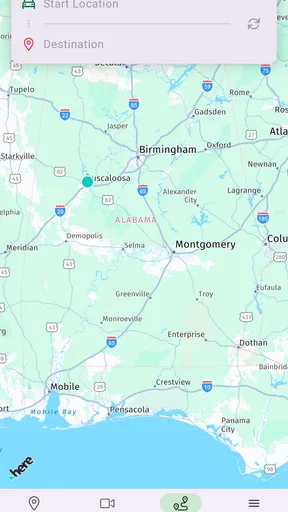
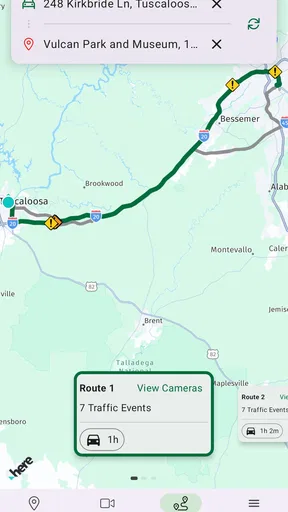

 Analysis by AppCompare
When I need a clearer picture of what is happening on Alabama roads, I would rather start with a transportation-focused source than rely only on a general map app. ALGO Traffic is a free Maps & Navigation app from the Alabama Dept of Transportation, built around giving drivers direct access to ALDOT information from a phone. That focus makes it more useful for checking road conditions and travel decisions in Alabama than for planning a trip anywhere else.
My overall impression is that its value comes less from trying to replace every navigation tool and more from serving as a state-specific companion. A regular navigation app is usually better at turn-by-turn directions, alternate routes, saved places, and broad trip planning. This app makes more sense when the question is, “What should I know about Alabama traffic before I leave?”
What the app is really useful for before and during a drive
The first thing I would do with ALGO Traffic is use it before starting a journey, not wait until I am already moving. A quick check can help me decide whether to leave earlier, delay a nonessential trip, or avoid committing to a route that looks fine on a normal day but may be affected by a traffic event. That small change in routine is where a state transportation app can earn its place on a phone.
It is also a practical second screen for people who already use another navigation service. I can imagine opening my usual map app for directions while checking ALGO Traffic separately for Alabama-specific information. That workflow avoids forcing one application to do two different jobs: navigation software can guide the route, while the ALDOT app can provide the local traffic perspective.
The strongest reason to install it is local focus, not feature overload. The developer is the Alabama Dept of Transportation, so the app is aimed at people who drive in Alabama regularly, commute across the state, or need a more direct way to consult transportation information. Someone who only passes through Alabama occasionally may find a general map service more convenient, but residents and frequent visitors have a clearer reason to keep this one available.
Speed expectations when checking a route
For a traffic app, perceived speed is not only about how quickly the interface opens. It is also about how quickly I can answer a question: Is my planned route worth taking, and has anything changed since I last looked? ALGO Traffic is most valuable when that decision can be made with a short check instead of searching through several unrelated sources.
I would not treat it as a replacement for a full navigation experience. If I need voice guidance, a sequence of turns, business searches, or a route that crosses several states, my normal navigation app is likely the better primary tool. The more specialized the question becomes—especially when it concerns Alabama traffic information—the more useful this app becomes as a companion.
Worth Reading Before You Choose

Flipboard Shows What News Apps Must Do Beyond the Feed

Switching to Android Auto Means Rethinking Your Driving Routine

Google Calendar Makes a Crowded Week Easier to Manage

Ludo King Makes the Most of the Minutes Between Plans

Baby Panda World Brings Quick Play to Modern Phones, but Its Game Library Feels Busy

ESPN’s Live Game View Makes Following Close Games Easier
A sensible habit is to check it while parked before leaving, then use it again only when safely stopped. That makes the app part of a planning routine rather than something I am tempted to operate while driving. It also gives the interface a fair test: opening it under calm conditions is more useful than judging it while rushing through a late departure.
What happens during heavy-use moments
Traffic apps are most important when many people need them at once: a busy commute, a major disruption, severe weather, or a holiday journey. Those are also the moments when patience matters most. I would expect the app to feel more valuable during an unusual road situation than during an ordinary drive, because current transportation information can influence whether I leave now or choose another plan.
There is a trade-off here. A state-focused application can be more relevant to Alabama roads than a broad platform, but it may not be the only source I want during a complicated trip. When I am traveling through several regions, I would combine it with my regular navigation app rather than expect ALGO Traffic to manage the entire journey. This is not a weakness in its purpose; it is a reminder to use the right tool for the right decision.
For a commuter, a useful workflow would be to check the app before leaving home, note whether the normal route deserves extra caution, and then start navigation elsewhere if turn-by-turn guidance is needed. For a family member waiting for someone on the road, the app can be part of a broader check before calling the driver. For a delivery worker or field employee, it can add a state-specific reference point before a series of stops.
One less obvious advantage of this approach is reducing dependence on a single source. If my everyday map app shows a route but does not make Alabama transportation information easy to interpret, I can use ALGO Traffic to challenge that first impression. That second look may be more useful than blindly accepting the fastest-looking route.
Reliability and how I would use it responsibly
I see reliability here as trust in the app’s role, not as a promise that every road situation will be represented perfectly at every moment. Traffic changes quickly, and no phone application can remove the need for judgment. I would use ALGO Traffic to inform a decision, then keep watching the road, signs, and official instructions rather than treating the screen as an authority over real-world conditions.
The app’s connection to the Alabama Dept of Transportation gives it a clear identity. That matters to me because a state transportation application feels more purpose-built for local road information than an app designed primarily around advertising, places, or general navigation. Still, the benefit is strongest when I am actually dealing with Alabama travel. Outside that context, the specialized focus becomes less useful.
Recovery is another practical consideration. If the app does not load smoothly on the first attempt, I would close it, reopen it while stopped, and compare the result with my regular navigation source before making a rushed decision. I would also avoid assuming that a temporary display problem means the road itself is clear. A responsible traffic routine always includes a backup plan, especially for an important appointment or a long drive.
Because the app is free, there is little financial risk in trying it as a secondary tool. The more meaningful cost is attention: I need to remember which app is for Alabama transportation information and which one is for navigation. That small distinction is easy to manage once it becomes part of my normal pre-drive routine.
Device compatibility, age rating, and everyday practicality
ALGO Traffic is available for Android devices running version 8.0 or later, which covers a wide range of phones still in everyday use. That makes it approachable for people who do not upgrade frequently. I would still keep enough free storage and a reasonably maintained device, because any navigation-related app is less pleasant when the phone is already struggling with many open applications.
The app is rated for Everyone, so its intended audience is broad. In practical terms, that suits commuters, parents checking a route before school travel, older drivers who want a focused local reference, and visitors preparing to cross Alabama. The age rating does not make the app automatically suitable for unsupervised use while driving; the safe way to use it is to check it before departure or after pulling over.
Resource demands are difficult to judge from the store details alone, so I would not claim that it is exceptionally light or heavy on a phone. My advice is simple: test it during a normal planning session, not in the middle of an urgent trip. If the app opens comfortably and gives you the information you need without making your phone feel crowded, it has passed the practical test for your device.
Keeping the operating system requirement in mind also helps when recommending it to someone else. If a family member uses an older Android phone, checking compatibility first avoids an unpleasant surprise. iPhone users may also want to look for the appropriate iOS version in their own store before planning around the app, rather than assuming that every phone supports the same release.
How it compares with ordinary map and traffic alternatives
General navigation apps usually win when I want one place for directions, estimated arrival times, businesses, saved locations, and route changes. They are familiar, often already installed, and designed for broad travel. If my priority is getting from one address to another with minimal setup, I would probably begin there.
ALGO Traffic has a different advantage: it is centered on exclusive ALDOT information. That makes it a more focused choice for Alabama road awareness, especially when a general map view does not answer the local question I have. Rather than asking it to replace a familiar navigation service, I would position it beside one.
News apps and social media can sometimes mention traffic problems, but they are less predictable as a driving reference. They may provide context, yet they also bring unrelated content and can encourage distracting browsing. A dedicated transportation app is easier to justify when I want a narrow check before leaving.
The trade-off is convenience. Installing a second app and remembering to consult it takes more effort than opening one all-purpose map. For someone who rarely drives in Alabama, that extra step may not be worthwhile. For someone whose daily route depends on Alabama roads, the local focus can justify the small amount of added friction.
Who will get the most from it
I would recommend ALGO Traffic first to Alabama residents, regular commuters, commercial drivers working within the state, and travelers who want a transportation-specific reference before a long drive. It is also sensible for households that share one car and need a quick way to check conditions before different people leave for work, school, or appointments.
A realistic example is a weekday morning when I have an appointment on the other side of town. I would check the app before getting ready to leave, compare what I see with my usual route, and then decide whether to depart early or use my standard navigation app for another path. If the trip is important, I would repeat the check after parking somewhere safe rather than handling the phone in moving traffic.
I would be less enthusiastic about recommending it as the only navigation app for a road trip that crosses state lines. I would also skip it if my main need is discovering restaurants, planning multiple stops, or receiving continuous spoken directions. In those cases, a full-featured map application is likely to be more convenient, with ALGO Traffic serving only as an optional local check.
What the current release and audience suggest
The current version is 3.1.5, and the app was released on February 26, 2025. I would treat that release information as useful context rather than a guarantee about how it behaves on every phone. App performance can vary with device age, operating system condition, and the situation in which it is being used.
Its audience is still developing. The app has more than ten thousand installs, with an average rating of 4.1 from dozens of ratings and twenty reviews. I read that as encouraging but not conclusive: there is enough public response to suggest real interest, yet not enough to treat the rating as a complete picture of every device and driving routine.
That is why I would judge it by a specific question: does it make my Alabama travel planning clearer than my current routine? If the answer is yes, the free price makes experimentation easy. If I already have a dependable local traffic workflow and rarely drive in the state, the benefit may be too small to change my habits.
My performance verdict after weighing the trade-offs
ALGO Traffic makes the most sense as a focused Alabama traffic companion. I like the fact that its identity is clear: it comes from the Alabama Dept of Transportation and gives drivers a direct place to look for ALDOT information. That local purpose is more meaningful than a long list of unrelated features would be.
My verdict on speed is cautiously positive in concept: the app should be judged by how quickly it helps with a pre-drive decision, not by whether it replaces a complete navigation platform. My verdict on heavy-use situations is practical rather than absolute: it is worth checking when travel matters, but I would keep a backup source and never depend on one screen alone. For reliability, I would use it as informed guidance, not as permission to ignore changing road conditions.
The operating system requirement is reasonable for many Android users, the Everyone rating keeps the intended audience broad, and the free price removes the main barrier to trying it. The main limitation is specialization. People looking for one universal travel app may find it unnecessary, while Alabama drivers who want a transportation-specific reference are the ones most likely to appreciate it.
I would install it if Alabama traffic is part of my regular life, then pair it with my usual navigation app rather than replacing it. Used that way, ALGO Traffic has a clear job, a sensible place in a daily driving routine, and enough local focus to be more than another generic map screen.
Pros
- Real-time traffic updates help drivers avoid delays and congestion.
- Clear road-condition information supports better route planning.
- Useful for checking traffic before starting a journey.
- Simple interface makes key traffic details easy to find.
- Can help reduce travel stress during busy commuting hours.
Cons
- Coverage and accuracy may vary depending on location and data sources.
- Traffic information may be less useful in rural or low-traffic areas.
- Frequent updates can increase battery and mobile data usage.
- Users may need location permissions for the best experience.
- It is not a substitute for careful driving or road signage.
FAQs for ALGO Traffic
What is ALGO Traffic and what does it do?
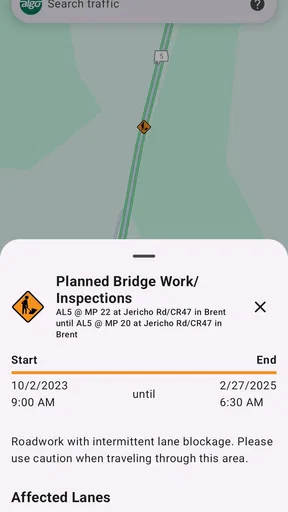
ALGO Traffic is a traffic-management and traveler-information app designed to help users stay informed about road conditions, incidents, construction, congestion, and other events that may affect their journey. After opening the app, users can typically view traffic information on an interactive map, check reported problems, and use available updates to plan a route more efficiently. The exact information and coverage depend on the region supported by the service.
Can ALGO Traffic provide live traffic updates and road closures?
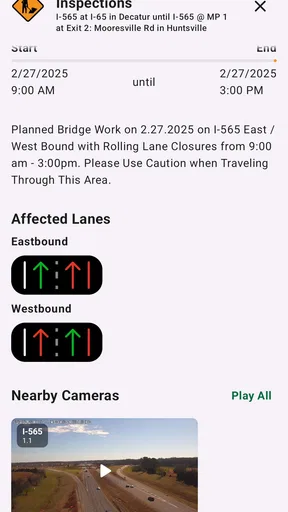
The app is intended to provide current transportation information, including traffic incidents, crashes, roadwork, closures, delays, and sometimes weather-related hazards. However, updates may not appear instantly because information depends on reports from transportation agencies, traffic sensors, cameras, and other sources. Conditions can also change quickly, so users should treat the app as a helpful planning tool rather than a guarantee that every road event is displayed immediately.
Does ALGO Traffic offer traffic cameras, maps, or route planning?
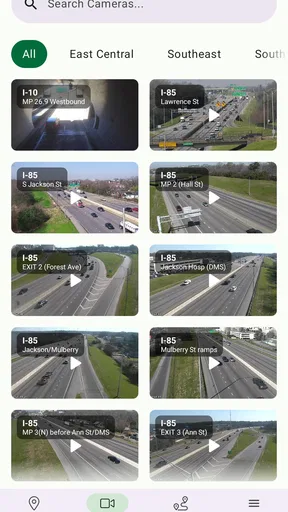
ALGO Traffic commonly focuses on map-based traffic information and may include features such as traffic cameras, incident markers, road-condition notices, and selectable map layers. Depending on the supported area and app version, route planning or travel-time tools may also be available. Before downloading, users should check the current feature list and coverage for their location, since available cameras, routes, and transportation data can vary by state or service region.
Is ALGO Traffic free to download and use?
ALGO Traffic is generally offered as a free public-service application, allowing users to access transportation updates without paying a subscription for basic features. Nevertheless, downloading the app requires an internet connection, and using mobile data may contribute to charges from your cellular provider. Some functions, such as video cameras or map loading, can consume more data than simple text alerts, especially during extended trips or frequent refreshes.
Does ALGO Traffic use location services, and is it safe to use while driving?
ALGO Traffic may request location access so it can show nearby incidents, center the map on your position, or provide more relevant transportation information. You can usually manage this permission through your device settings, although disabling it may reduce convenience. The app should always be used responsibly: review information before starting your trip, use hands-free features when available, and never interact with the screen while driving.


